![]() |
Posts Tagged ‘Tamiya’ »
In Progress » Millenium Falcon [1/72 Fine Molds Kit] » Discoloration Tutorial Pt 6 »
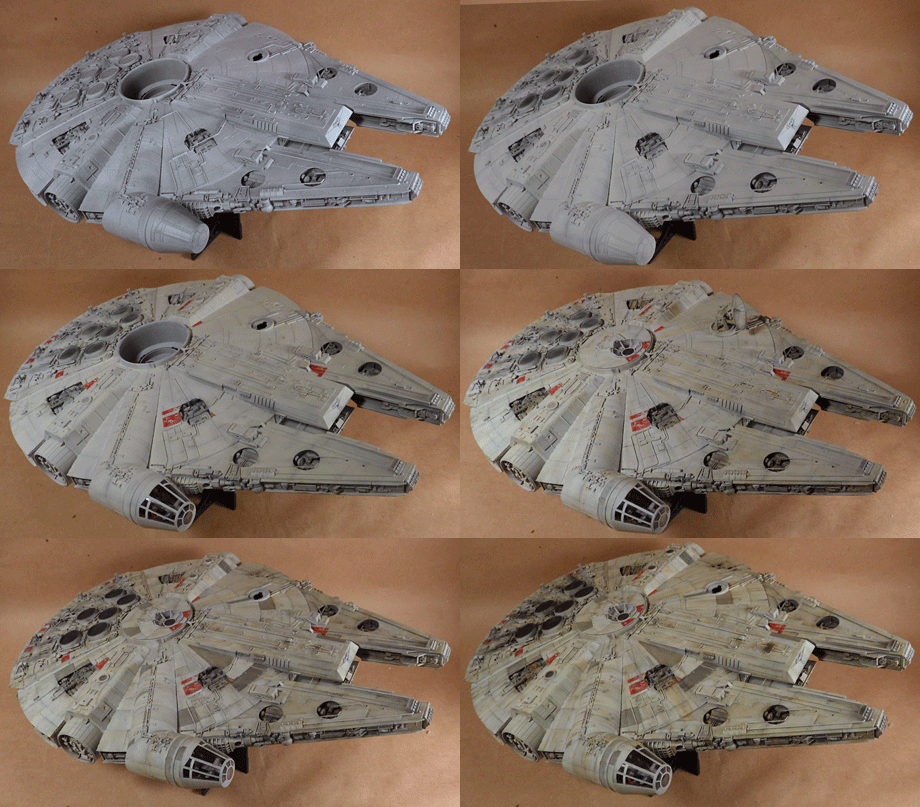
And here’s the last part of the Falcon painting and weathering tutorial. I hope you guys have enjoyed it. This last step is the application of pigments to enhance the engine grime and add blaster marks.
Here’s an animation showing the pics from start to finish. This shows the gradual application of grime and darkening of the kit. No need to start with a dark paint to get dirt.
In Progress » Millenium Falcon [1/72 Fine Molds Kit] » Discoloration Tutorial Pt 5 »
Been a few days since the last update, but the individual panel discoloration takes a bit of time, both in application and in drying. However the results are fabulous. Here’s the model with the panels completed.
Once they had dried it was time to apply the streaking. Here’s the tutorial followed by a few notes below.
Once the tutorial was over I worked on the rest of the model and decided to add some more defined dark streaks. These are done almost the same way. Paint them on very thinly with thinned oils then blend them with a dry or damp brush. Simple, but effective. Here’s the completed streaking. Next up: pigments.
In Progress » Millenium Falcon [1/72 Fine Molds Kit] » Discoloration Tutorial Pt 4 »
I needed to let the kit rest another day since it’s been really humid and dank here. That tends to make oil paint take longer to dry and I don’t have a large enough “hot-box” for this kit. (wood crate with a lightbulb for heat… speeds drying time) This next step will take me another day or two to complete not including drying time, but I wanted to show the video now.
This step is painting indevidual panels much like I did on the Tantive IV. This adds depth and dimension and a whole lot of visual interest. Here;s the video tutorial…
And here is the photo of what I did during and immediately following the video to provide more detail.
In Progress » Millenium Falcon [1/72 Fine Molds Kit] » Discoloration Tutorial Pt 3 »
Part three of this tutorial series covers painting the gray panels with oil paints. Pardon the stutters in the video. This was take two after a mishap involving oil paint on my favorite jeans and a screw-up trying to use liquid mask which the thinner involved apparently works great at removing.
Here’s the completed vessel.
For most of the painting I was able to simply paint an entire panel using the panel lines as a guide. For some however I needed to hand-paint the edge. This sounds difficult, especially with the blending, but after you blend, you can clean-up the outside edge with a 1/4″ flat brush dampened with turpenoid. This removes the edge oil paint since it’s still wet. Another fantastic feature of painting with oils… easy mistake fixes!
For different gray panels I used different mixtures of oil paint. Some had “Starship Filth” used instead of the “Dark Mud”. This makes for a more realistic and visually pleasing look.
This same technique, while not videoed was applied to the two yellow panels on the underside using 502 Abteilung Luftwaffe Yellow.
Now my workshop has been a little cool and damp the past day or so which makes the oils take longer to dry. Hopefully they’re dry enough tomorrow, but if not they will certainly be the next day to continue on. I’ll also take a photo of my pallet so you can see the paint colors used in case you need to mix your own.
In Progress » Millenium Falcon [1/72 Fine Molds Kit] » Discoloration Tutorial Pt 2 »
Today I applied my second layer of the Discoloration Technique to the Falcon. Usually I only apply one layer, but I really want this to have a lot of depth and a lot of age to the look. First off is part 2 of the video tutorial:
And again, here’s a close-up image of the area I worked on before applying it to the rest of the kit.
Here’s the kit with the full application of the 2nd discoloration.
Another close-up. While my primer and preshade darkened the visible engine areas, I’ve bee adding extra dark mud and starship filth to those to get them nice and grimy.
After this dries for a day I’ll begin the modulation (adding light and darker tones) to the various panels as well as painting the gray panels in oils.
In Progress » Millenium Falcon [1/72 Fine Molds Kit] » Discoloration Tutorial Pt 1 »
Moving right along, it’s time for a tutorial on discoloration. I’ve talked about this technique on just about every weathered model I’ve done for the past 6 years or so. It’s fantastic and really gives the surface a beautiful worn appearance. All of these steps add layers of detail, color and weathering to the model enhancing the finished appearance. Experiment with different colors over different base coats. First off, my first voiced tutorial video… [shudders] You may be able to get the HD version I uploaded by clicking the link.
Here’s an image of that section completed to show what the video may not. Note that the parts to the left and right were not discolored yet, only filtered.
Now here’s the entire Falcon with the discoloration applied.
A close-up…
And a battle droid? No, wait… (He’ll barely be visible once the gun is mounted. Chewie is operating the lower turret. LOL!
And finally, here’s the clear replacement engine parts. I painted them with Tamiya Smoke then a flat coat so that they’ll light up nicely, but not be too visible when the light’s off.
In Progress » Millenium Falcon [1/72 Fine Molds Kit] » Wired and Painted »
Now that the Tantive IV is done and I’m feeling refreshed and inspired to model again, I’ve come back to the Millenium Falcon build. “Come back” you say? Yeah… I started this in August and got it almost ready for paint, then something happened and I put it aside for a while. I had posted pics of the beginnings of Facebook, but not in the site. No worries as I’m reposting those pics here as well. This build will eventually go into the large Death Star 2 diorama. Here it is compared to the A-Wing, also to be in the diorama.

My client and I decided that this beastie needed to be fully lit. Wiring was the usual pain in the ass having burned myself several times and melting a few LEDs in the process causing some rework. I’m not used to soldering but I wanted everything to be very robust. The usual wire wrap I use is too brittle to risk inside of this.

Using the Acreations photoetch update set I was able to easily do the cockpit lighting. The set is awesome and has all the holes to backlight the consoles ready to go. Just paint and add the fantastic decals and the cockpit is about ready.

The figures with the exception of Nien Nunb the copilot were modified from the kit figures. Basically I just added rebel hats to Luke and Obiwan made from Aves and modded Han to make Lando. Nien Nunb is from a Studio Starforge resin figure set.

Lincoln is huge.

And now onto the good part… the kit construction was finished yesterday so what you see below is todays progress. I decided to do a short step-by-step on the painting process since there was a lot if interest in how I did the Tantive IV paint.
I started off by priming the kit. I didn’t have any typical gray primer, but I had dark gray and white Duplicolor primer. So I first primed it in the dark gray primer, then applied a second coat of the white. This had a slight shading benefit and came out the base primer gray I wanted. Windows were masked with Parafilm “M”.
Next I preshaded the panel lines and recesses using Tamiya German Gray. No need to be precise as the effect will be pretty subtle after the top-coat. If not… you’re not doing it right. If you’re having trouble, your top-coat may be too thin or your pre-shade may be too dark. Experiment with different color preshades. For a tan vehicle, try a brown pre-shade, etc…
Next I applied the top-coat. This was a mixture of Tamiya Flat White (1 jar) + Tamiya Gloss White (1/3 Jar) + Tamiya Flat Earth and Neutral Gray. Apply it uniformly on the tops and bottoms and spray at an angle over detail areas to retail some of the pre-shade in recesses.
Once the top-coat cured a bit I masked and painted the dulled red markings. I would apply tape, then sponge on some 502 Abteilung Liquid Mask for the chips. Once sprayed and cured a bit rub the mask off to reveal the chips. After that I sponged on some light gray chips. This will show up as chips and texture in the end. Mostly be careful not to over-do it. I concentrated on areas in the reference that were chipped as well as masses of raised detail parts. You may notice I did not mask the dark gray or yellow panels. This is because I plan to hand-paint these with oils during the later modulation phase. I did this with some of the darker panels on the Tantive IV with great results.
When the chipping is done immediately apply your first filter. I used a 502 Abteilung German Ochre oil paint thinned with odorless turpenoid. This is thinner than a wash, but not applied like a wash. Just dampen your brush and paint it onto the kit. If it’s flowing into panel lines and pooling you’re brush is too wet with filter. Depending on your thinness or desired color you may need a few layers of filter. You should wait 4-12 hours inbetween. The filter soaks into the flat paint quite nicely so try to do it before any clearcoats.
The filter will slightly modify your paint colors. You may be asking: “Why filter it at all? Why not paint it the right color from the start”. Well, sometimes it’s hard to get the right paint color as they tend to look different after sprayed from an airbrush and dry. The filter is like using Photoshop on your model to tweak the color. It also has the benefit of being uneven enough to act as the first signs of weathering and to tie unrelated colors together so that they look like they belong on the same model/saw the same conditions.
And finally for this update, some pics of the lighting. I still need to install the clear engine parts casts and the covering “grill”.
Custom Clear Colors »
I’ve been wondering for quite some time as to how to make a decent custom clear color for candy coats. My goal was to replace my Tamiya Clear colors with something that goes on as nice as Future Floor Acrlyic.
I experimented with Future + Colored Higgins Inks, but they wouldn’t blend and just made a mess.
I then tried a mixture of Future + Food Coloring, but the mixture was too thin and ran all over. Then I had a thought…
I used my previous mixture of about 1 teaspoon of Future + 5 drops of food coloring. To that mixture, I added approx 3 drops of Tamiya Clear for every drop of food coloring. The result was thicker than I had wanted, causing sputters from my airbrush (which needed cleaned as well) however, aside from what spattered from the tip of the needle, the coat went down very nice and smooth. I would probably try 1 or 2 drops of Tamiya clear per drop of food
coloring next time.
So to sum it up:
Non-Tamiya (sort of) Custom Clear Colors:
- 1 tablespoon of Future Floor Acrylic 5-6 drops of food coloring to get a deep color
- 1-2 drops or Tamiya Clear / 1 drop of Food Coloring to thicken mixture
I’ll post an image when I use it on a non-scrap piece.
Making and Painting Lenses and Eyes »
How do I paint the lenses and eyes on my kits? This topic has been brought up at message boards and I’ve gotten quite a few e-mails about it. So since I was taking pics for my MG Wing Gundam Ver. Ka., I thought I’d kill two birds and make a tutorial as well.
Most Bandai Gundam and mecha kits come with shiney foil stickers for the eyes and lenses. These tend to be ugly, a pain to work with, and in the end, they just look like stickers. Blah.

Some of these kits come with clear plastic parts for the eyes and larger lenses like the forehead sensors on a Gundam for example. These come with stickers too, but why cover up a clear part with a sticker when you can make them have depth and interest?
What about the parts that don’t come with clear parts? How can we make those look good? How can we we avoid masking? The answer is not too difficult and we’ll be using the stickers to boot!
Get some clear plastic. Several companies make it, or you can just use leftovers from an action-figure blister package. For this example, I’m using leftover bits of clear vacuform plastic.
Place the stickers on the clear plastic and use them as a template to cut out your new lenses. Remove the stickers and place them back onto the sheet for future use if needed.

Next we’ll place the lenses onto some tape rolled backwards on a skewer so that the sticky-side is out. This will make them easier to paint. Do the same with all of the clear parts supplied with the kit if any.

Next we’ll paint the backs of all of these clear parts with Tamiya Chrome Silver or any silver model paint. After they dry, take them off of the tape and flip them over onto fresh taped skewers. Notice how the silver is behind the part giving the lens some depth. Since eyes on the MG kits are very deep, I normally just paint the front of the eyes silver or else they tend to look too dark and not catch the light.

Next we’ll airbrush Tamiya clear colors onto the tops of the lenses. For this example, I used a mixture of Clear Green and Clear Yellow mixed with a little 91% Isopropyl alcohol to thin the paint. Any of the Tamiya Clear colors will work.

After we spray the clear, you may notice if looks a little fuzzy and frosted. Don’t fret, our next step will fix that.


To make the lenses really glossy and shiney, we’ll use Future Floor Acrylic. I brushed on 4 coats of FFA letting each coat dry for an hour in between. Notice how glossy and much nicer these look than the stickers already. Using the clear plastic gives you thicker lenses than the stickers would have and adds a nice touch to the kit.


After the FFA has cured completely (about 24 hours) we’ll remove the parts from the tape.
Next we’ll use a technical ink pen to outline the outside of the eyes with black ink. After the ink dries, give that part another coat of FFA with an airbrush as to not smudge the ink.

After the kit is completely done and all the clear and flat-coats have been applied, glue these into place using a very small amount of white glue. (Elmer’s Glue)


Clear Coats with Future Floor Acrylic »
Here’s another question I get asked a lot in e-mails. How do you flatten Future and what is it? Future Floor acrylic is basically just a clear acrylic that you mop onto your floor to protect it from scratches and scuffs. Somewhere along the line someone figured out you can use it as a clear coat for models.
What’s great about Future Floor Acrylic (FFA) is how versatile it is in modeling. You can use it to protect your kit, make canopies and clear parts really shine, and by mixing it with Tamiya Flat Base (FB) you can make any sheen you want for a clear-coat. Tamiya Flat Base is not a paint or clear-coat on its own, but instead, it’s an additive to make gloss paint flat or dull.

To make different clear coats, combine FFA and FB using the chart below:

After you mix your FFA and FB you can store it in an airtight jar for an extended period of time. To apply it to your model, airbrush it on your model (unthinned) in light coats. I spray a thin layer, dry it with my airbrush air-only real quick, the spray again. Check out my airbrush tutorial for more detailed info on the technique.
Do not mix more than 30% FB to FFA as you will end up with either a cloudy coat or white spots. I use an old infant medicine measuring syringe to measure out my ingredients. This is just how I do it. For more info on FFA, check out the Complete Future page by clicking here.
|


Tired of expensive and slow web design services? Looking for quality design with a fast turnaround? Whether you need an all new design or updates to your existing site, I'll give you the same speed, professionalism, and attention to detail.